
It is late November. January already has gaps in the diary, December is filling with skincare and gift orders, and you want to send one simple message to the clients who were in last spring. So you open the booking system to pull the list, a separate email tool to write the message, a texting app to send a reminder, and a spreadsheet to keep track of the code you promised. Four logins for one offer.
This guide looks at the aesthetic clinic marketing tools that sit inside Faces, the booking and consent platform clinics already use to run the diary. The Faces homepage describes them as free marketing tools designed to help you expand and retain your clients. We describe only what is visible on live Faces pages on 25 November 2026, how to use each tool sensibly, and where the UK marketing rules draw the line. There are no open rates or follower figures here, because a tool cannot promise those for you.
Aesthetic clinic marketing tools on the Faces Marketing screen
The marketing graphic on the Faces homepage shows a Marketing screen in the app, headed “Marketing and branding all in one place!”. It lists six options, each with a one-line description:
- SMS & WhatsApp: “Send a reminder or promo message.”
- Emails: “Send an email direct anytime!”
- Social media management: “Content creation and posting.”
- Discount codes: “Create a discount code for clients.”
- Marketplace: “Grow your online profile.”
- Categories: “Marketing tools to target audiences.”
None of these is new on its own. The difference is that they sit next to the bookings, consent forms and client records you already keep in Faces, so a promotion starts from your real client list rather than an export you have to tidy up first.
SMS, WhatsApp and email from the same client list
The first two options cover the messages clinics send most: reminders and promotions by text or WhatsApp, and direct emails. Reminders are the easy win. A client who is reminded about an appointment, or about the review date on their treatment plan, is more likely to turn up prepared. Promotional messages need more care.
Under the UK rules on electronic marketing, the ICO guidance on electronic mail marketing says you must not send marketing emails or texts to individuals without specific consent, with a limited exception for your own previous customers, often called the soft opt-in. In practice that means: ask for marketing consent when a client books or registers, keep a note of what they agreed to, give an easy opt-out in every promotional message, and keep reminders and marketing separate in your own head even when they leave from the same screen. The ICO direct marketing hub is the place to check if you are unsure.
We covered message ideas in an earlier post on using SMS and email for promotions in aesthetic clinics. The difference now is that those messages can start from the same platform as the booking itself.
Discount codes you control, at the point of booking
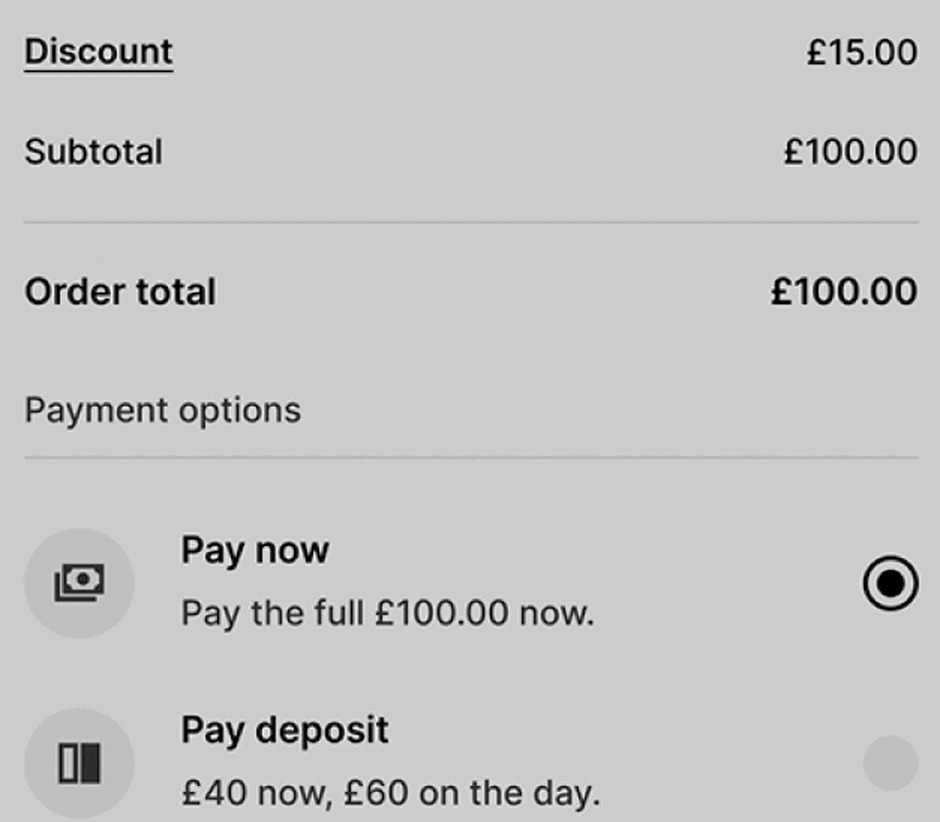
The Discount codes option is described simply as “Create a discount code for clients.” A second homepage graphic shows what that looks like for the client: a payment summary with a discount line, the order total, and a choice to pay in full or pay a deposit now and the rest on the day. Because the code is applied where the client books and pays, you are not tracking redemptions in a separate spreadsheet or relying on the client to mention it at the desk.
Good uses for a clinic discount code include:
- A thank-you code on retail skincare from the skincare aisle on Faces, so clients restock between appointments.
- A returning-client code for a skin consultation or a non-prescription facial in a quiet week.
- A December gift offer, packed in clinic gift packaging such as the Gift Bag (Qty 10) or the Gift Box (Qty 5), both sold on Faces by CosmoPro.
- A referral code that a loyal client can share with a friend.
Two rules keep discount codes safe. First, promotions are covered by the CAP Code section 8 on promotional marketing, so state the closing date, any conditions and who can use the code, and honour it. Second, do not attach a discount, a free offer or a promotion to a prescription-only medicine. The ASA’s advice on botulinum toxin products is clear that botulinum toxin is a prescription-only medicine that cannot be advertised to the public, and it notes a ruling where a promotion that applied only to anti-wrinkle treatments was treated as an indirect ad for a POM. Put codes on consultations, skincare, non-prescription treatments and gifts instead.
Social media management with Plump Marketing
If you want help with the third option, social media management, the Faces social media marketing page sets out a managed service for aesthetic clinics run by Plump Marketing Agency. The platforms it lists are Instagram, TikTok, Facebook, LinkedIn and YouTube (each linked here to Faces’ own account), and the page describes a seven-step process: clinic and competitor research, content planning, professional content creation, platform management, paid advertising, monthly reporting and strategy optimisation.
The page also says the service starts with a trial period and then runs on monthly plans without rigid long-term contracts, and that new clients get a strategy call once payment is processed. Check the page for current packages before you commit, and remember that anything an agency posts on your behalf still has to follow the same advertising rules as your own posts.
If you would rather learn to do it yourself first, the Aesthetician Marketing E-book by Plump Marketing is sold on the Faces shop by Plump Marketing, alongside other titles in the E Books aisle. The social media marketing page says the guide covers branding, content planning, posts, stories and reels, and setting goals.
Your Marketplace profile: be found where clients book
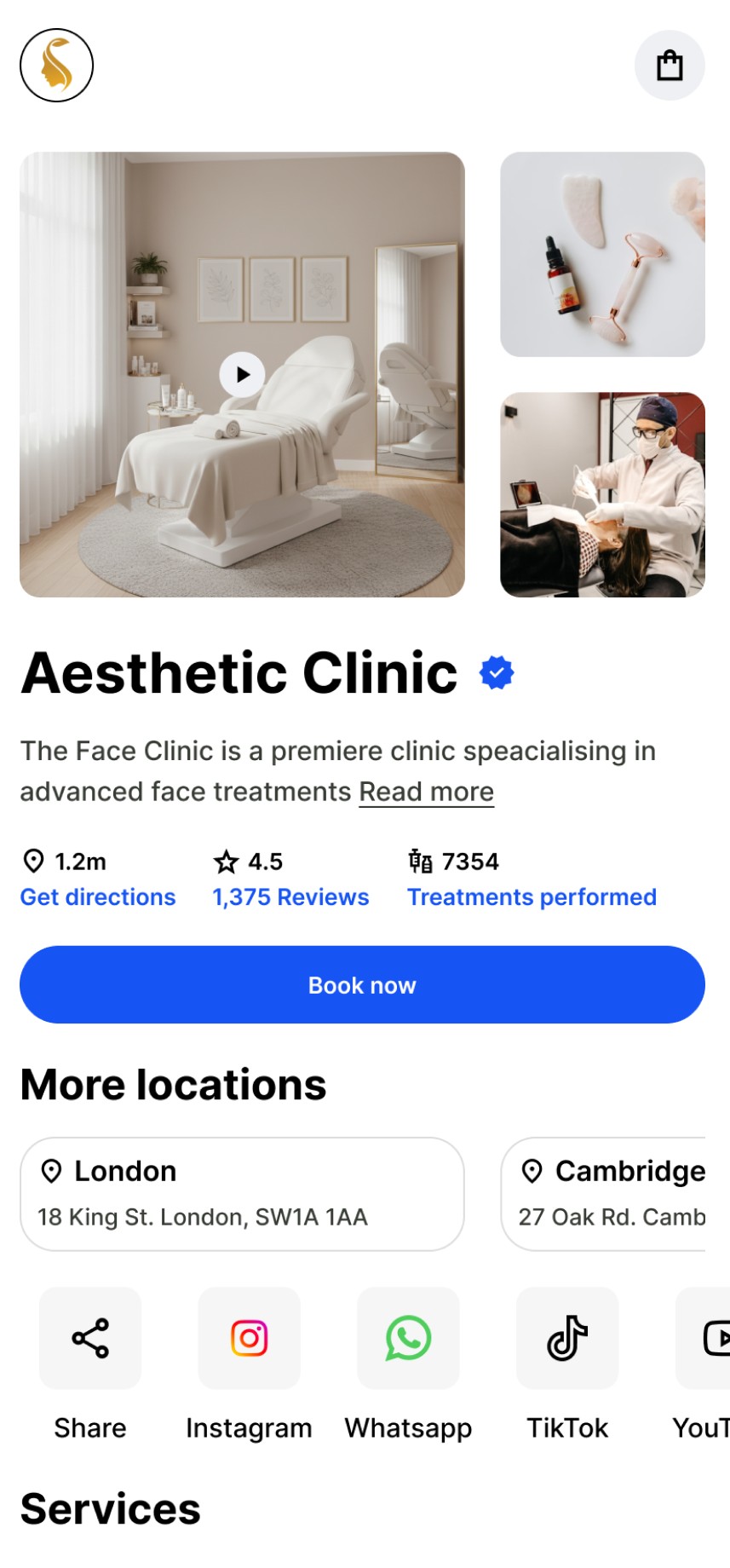
The Marketplace option reads “Grow your online profile.” The Faces app screenshots on the App Store show what a clinic profile can look like: photos of the clinic, a short description, directions, a Book now button, other locations, and share buttons for Instagram, WhatsApp, TikTok and YouTube. Clients can search the Faces clinic directory and book from there, and the Share button means one profile can travel with every post and message.
If you want your own branded site too, the Faces website builder puts booking on a clinic website, which we explained in our guide to the Faces clinic website builder. The Categories option, “Marketing tools to target audiences”, is the last item on the menu; we have not described it further here because the live pages do not yet show more detail.
However clients find you, the booking journey still matters. Our post on responsible online booking for aesthetic clinics covers leaving room to decide, which matters even more when a client arrives through an offer.
Why Faces: one platform instead of three
Faces is clinic software first. On one platform you can take online bookings and payments, send digital consent forms and aftercare forms, keep client records, manage your team and use the marketing tools above. Faces is a booking system with a built-in pharmacy and marketplace: it includes Faces Pharmacy and the multi-seller Faces shop, so clinics can buy products without leaving the system.
That matters for marketing. For a December skincare offer you can book appointments, take consent and order clinic stock from the same Faces platform, then send the message and create the code without exporting a list. Fewer tools means fewer subscriptions, fewer passwords and fewer places for client data to drift.
That is the idea behind “Stop paying for growing your aesthetic business” on my YouTube channel, @Ashfromfaces. For shop updates, see the Faces Pharmacy channel. Follow Faces on Instagram, TikTok, LinkedIn, X and Facebook, or follow me on X @Ashfromfaces.
Measure what you send
Marketing tools only earn their place if you look at what happens next. Before you send anything, pick a few measures: rebookings from the clients you messaged, how many people used the code, and whether the gaps you wanted to fill were filled. Our guide to six aesthetics clinic KPIs worth tracking sets out the most useful ones. Compare each campaign with a normal month and change one thing at a time.
Set up your marketing tools on Faces
The Faces homepage says the platform is free to use and no card is needed to join. If you already run your diary on Faces, look for the Marketing screen in the app. If you do not, create a free account, add your treatments and client list, and the marketing tools sit next to them from day one. The app is on the App Store and Google Play.
FAQs
Are the Faces marketing tools free?
The Faces homepage describes them as free marketing tools. The managed social media service on the social media marketing page is a separate service from Plump Marketing Agency, and the e-book is a paid shop listing, so check those pages for current terms.
Can I send a promotional text to every client on my list?
Not automatically. The ICO says marketing emails and texts to individuals need specific consent, unless the soft opt-in for your own previous customers applies. Reminders about booked appointments are different from promotions, but keep the two clearly separate.
Can I create a discount code for anti-wrinkle injections?
No. Botulinum toxin is a prescription-only medicine and cannot be advertised to the public, and the ASA treats offers on it as advertising. Use discount codes for consultations, skincare, non-prescription treatments and gifts.
Do I still need a separate marketing platform?
Many clinics will not. Faces brings reminders, promotional messages, emails, discount codes and your Marketplace profile into the booking system. If you want hands-on content and paid ads, the social media marketing page sets out the managed option.
Ashley James Simpson-Davies INP MSc RN