
It is Saturday morning at your second site. A locum practitioner is covering, the first client is a review, and the notes from her last appointment are in a folder at the main clinic. Someone sends a photo of a handwritten page over a messaging app, someone else remembers a detail differently, and the review starts ten minutes late with less certainty than anyone would like.
Nothing went badly wrong, but the patient record split the moment the team did. This guide looks at what clinic team management software should actually help with, what Faces publishes about its team features, and the simple habits that keep one clear record however many people and locations you have. Everything about Faces here was checked on the live Faces site on 21 November 2026, and if you want to try it with your own team you can register for Faces first.
Why the patient record splits when a clinic grows
A solo practitioner holds the whole story in one diary and one set of notes. Growth changes that: a second room, a part-time nurse, a receptionist, a locum or a second location. Each is another chance for the record to fork.
The common patterns are familiar:
- Version control. Paper notes, a shared spreadsheet and a phone diary each hold part of the picture, and nobody is quite sure which is current.
- Location gaps. A client who books at one site and returns to another arrives with no history visible to the person treating them.
- Unclear authorship. An entry says “reviewed, happy” with no name, so a colleague cannot tell who saw the client or what was discussed.
- Diary clashes. Two people book the same room or the same practitioner because they are looking at different calendars.
- Leavers and locums. Access is given in a hurry and never quite taken away, or notes made by a locum are kept somewhere outside the clinic’s own system.
These are workflow problems first. The aim is a team that shares one diary and one record, with each entry attributed to the person who made it.
What clinic team management software should do
When you compare clinic team management software, it helps to judge it against the jobs your team really does each day, rather than a long feature list. A practical checklist:
- One shared calendar. Everyone books into the same diary, and you can view it by team member and by location.
- Appointments tied to a named practitioner and place. Each booking records who is treating and where, so the record follows the client rather than the building.
- Consent and aftercare attached to the appointment. Forms sit with the booking and the client, not in a separate inbox or drawer.
- Notes on the record. Clinical notes are kept with the client’s history, so the next practitioner sees what happened last time.
- Simple joining and leaving. You can invite a new team member quickly, and you know how to remove access when someone leaves.
Ask any provider to show you a real example: a client booked at one site, then seen at another by someone else. If the second practitioner cannot see the history easily, the record will split again.
What Faces says about its team features
The Faces homepage has a section called “Join & Manage Teams”. It describes the feature in its own words: join teams, work anywhere, and collaborate while staying in control. The neighbouring section says you can store unlimited forms, oversee multiple clinics and manage real-time bookings on one platform, and the homepage FAQ answers “Can I manage multiple clinic locations?” by saying Faces allows you to manage multiple clinics from a single account.
The Faces app graphic that sits with that section shows an “Introducing teams!” screen with the line “Invite your team members, share calendar and manage bookings”, and buttons to invite now or later. Behind it is the Faces calendar, filtered by “All locations” and “All team members”. That is the core idea: one diary that the whole team shares, which you can narrow down by person or by site.
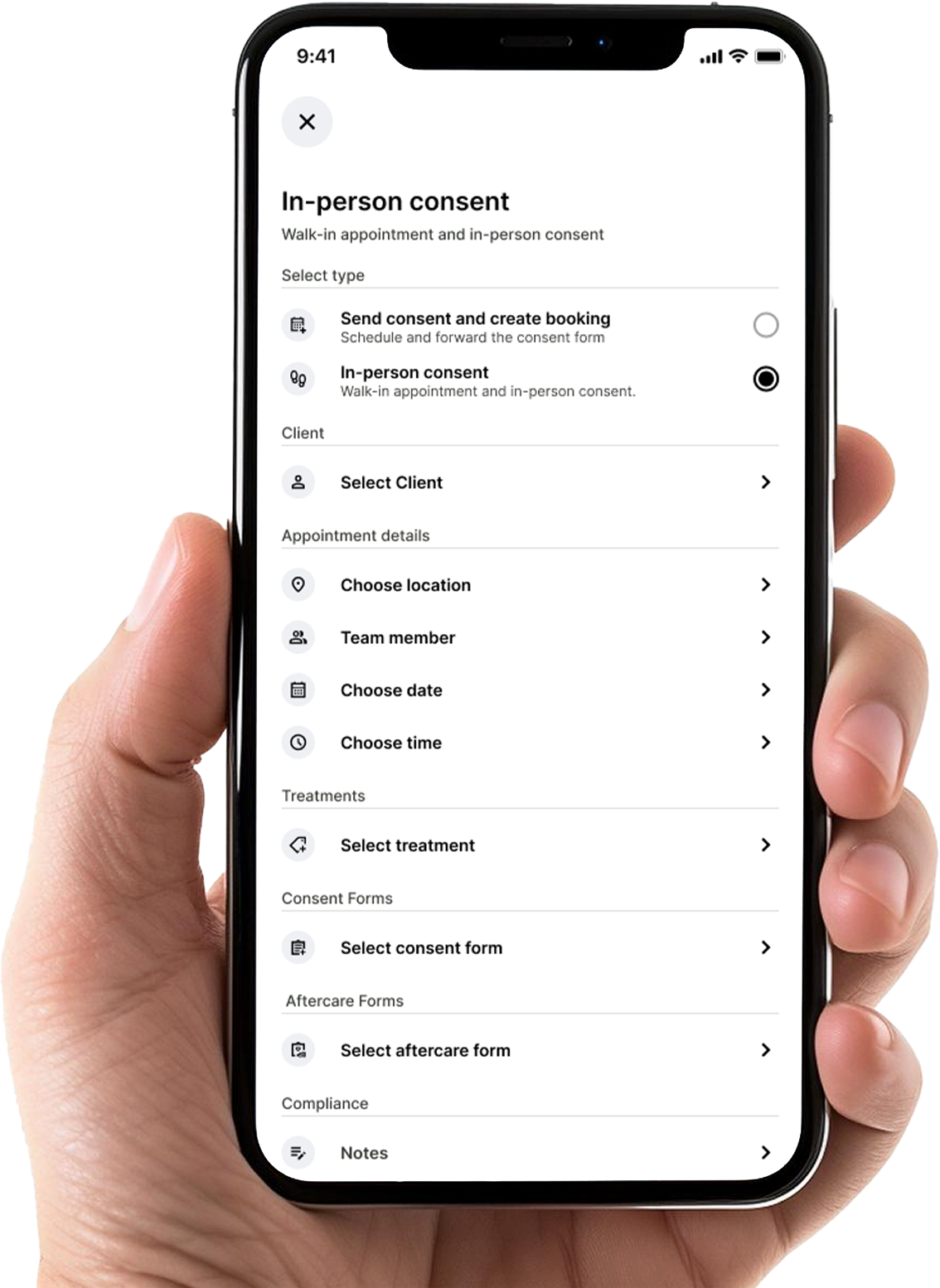
The Faces In-person consent screen on the homepage asks you to select the client, then set the appointment details: choose location, team member, date and time. It then links the treatment, the consent form and the aftercare form, with a Notes field under Compliance. So who is treating, and where, is part of the appointment itself.
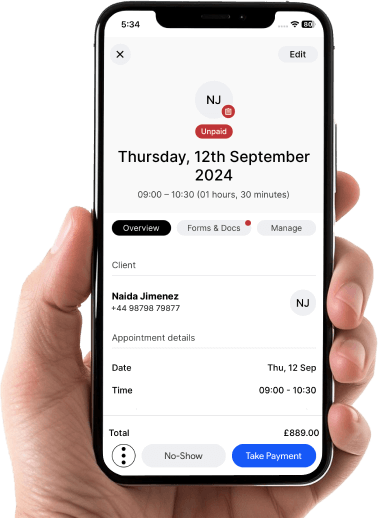
The appointment screen graphic shows a booking with Overview, Forms & Docs and Manage tabs. Our earlier article on Faces as patient management software describes the wider picture of bookings, consent and treatment records kept together, and digital consent forms beyond the signature explains why the substance of a consent discussion matters more than a completed form.
What the Faces pages do not set out is a detailed list of team roles or permission levels. If you need specific controls, for example limiting what a receptionist can see, ask Faces directly and check it in the app before you rely on it. Do not assume a feature from the word “control” alone.
A team routine that keeps one patient record
Software gives the team a shared place to work. The routine is what keeps the record whole. These habits are simple and work in clinics of any size:
- Invite everyone into the same account. Locums included. If someone is treating your clients, their bookings and notes should live in your clinic’s system, not on their own phone.
- Book every appointment against a named practitioner and location. It takes a second at booking and saves confusion at every review.
- Send consent and aftercare from the appointment. Use the forms library so each client’s paperwork is attached to the visit it belongs to.
- Write notes a colleague can act on. Record what was discussed, what was agreed and what happens next. A note that only says “consented” helps nobody.
- Hold a short handover. At the start of a shared day, look at the calendar by team member and flag reviews, complications follow-ups and anything unfinished.
- Plan joining and leaving. Have a checklist for new starters and a same-day step for removing access when someone leaves or a locum’s contract ends.
The same thinking applies to the rest of the clinic day. Our guide to practice management software and clinic services covers how booking, records and supply sit alongside one another, and aftercare forms for aesthetic clinics looks at what to send after treatment and how to keep it on record.
Professional responsibility stays with the clinician
A shared system makes the record easier to find. It does not change who is responsible for it. Each registered professional remains accountable for their own assessment, consent discussion, treatment decisions and the quality of their notes, in line with their regulator’s standards, such as the NMC Code for nurses and midwives.
The clinic, as the organisation holding client data, also has duties under UK data protection law: who can access records, how long they are kept and how they are secured. The ICO guidance for organisations is the place to start. Clinic team management software supports good practice, but it does not guarantee compliance on its own. Your policies, training and day-to-day habits do that work.
Why Faces
Faces is clinic software built for aesthetics: online booking, digital consent forms and aftercare forms, client records, team tools for sharing the calendar and managing bookings across locations, and related services listed on the site. It is a booking system with a built-in pharmacy and marketplace.
Faces includes Faces Pharmacy and a multi-seller marketplace, the Faces shop, so clinics can buy products without leaving the system. For a team, that means you can book appointments, take consent and order clinic stock from the same Faces platform, whichever site you are working from. Our guide to ordering clinic stock from your booking system explains the weekly routine.
A second room or site also means a second set of everyday consumables. The basics every treatment room shares are in the shop:
- Couch rolls, including the Bed / Couch roll (Blue/White)
- Gloves, such as Pink Nitrile Gloves Powder Free (Medium)
- Sanitisers and wipes, including Clinell Universal Sanitising Wipes x 225 (bucket) for shared surfaces and devices
- Aprons, such as 200 Disposable Polythene White Aprons
In The best aesthetics booking system, Ash walks through the Faces booking system. There is more on running and growing a clinic on the Ash from Faces YouTube channel. For day-to-day updates, follow Faces on Instagram and Faces Pharmacy on TikTok.
Bring your team onto one record
Start small. Create your Faces account, invite the people who treat your clients, and book next week’s appointments against named practitioners and locations. Send consent from the Faces consent forms library and hold a five-minute handover on your first shared day.
FAQs
What is clinic team management software?
It is software that lets several people in a clinic share one diary and one set of client records: booking appointments against named practitioners and locations, attaching consent and aftercare, and keeping notes where colleagues can find them.
Can Faces manage more than one clinic location?
The Faces homepage FAQ says Faces allows you to manage multiple clinics from a single account. The calendar shown in the Faces teams graphic can be viewed across all locations and all team members.
How do I add team members in Faces?
The Faces teams screen invites you to invite your team members, share the calendar and manage bookings. Register for Faces first, then use the teams invitation in the app.
Can I control what each team member can see?
Faces describes its teams feature as collaborating while staying in control, but its public pages do not list specific roles or permission levels. Ask Faces and check the settings in the app before relying on a particular control.
Does team software make my clinic compliant?
No. It supports good record keeping and safer admin, but compliance depends on your policies, training and practice. Each practitioner remains responsible for their own assessment, consent and notes, and the clinic remains responsible for how client data is handled.
This article is general information for clinic owners and practitioners, not legal or regulatory advice. Check your regulator’s current standards and ICO guidance for your own circumstances.
Ashley James Simpson-Davies INP MSc RN