
It is the end of a busy clinic day. The diary says eleven appointments, the card machine app says ten payments, and one client paid part by bank transfer after a review. Someone now has to match three screens before they can lock up. It is small, daily admin that grows as a clinic gets busier.
This guide is about choosing a clinic card reader UK clinics can live with day to day: one that fits the way you book, consult and check clients out. Faces has a card reader machines page that lets you compare the card payment providers it works with. Below, we explain what that page actually covers, the questions worth asking any provider, and how payments fit alongside booking, consent and stock on the Faces platform. Everything here was checked on the live Faces site on 20 November 2026.
Why payments and the diary drift apart
Most aesthetic clinics take payment in more than one moment. There may be a deposit when the appointment is booked, the balance on the day, a product sold at checkout, and occasionally a review or top-up appointment that is charged differently. If the card machine, the booking diary and the bank feed each tell part of that story, the end-of-day check becomes a small reconciliation job.
The fix is rarely a single gadget. It is a simple routine: take payment at the same point in every appointment, use clear references, and know which system is your record of what was booked and what was paid. The card reader you choose should make that routine easier, not add another place to look.
- Take payment at a fixed point, for example at checkout once aftercare has been explained, so nothing is left to memory.
- Match each payment to an appointment using the client name and date, so a missing payment shows up the same day.
- Decide how deposits are handled before you choose hardware, because some providers support payment links and some clinics prefer to keep deposits separate.
What the Faces card reader machines page covers
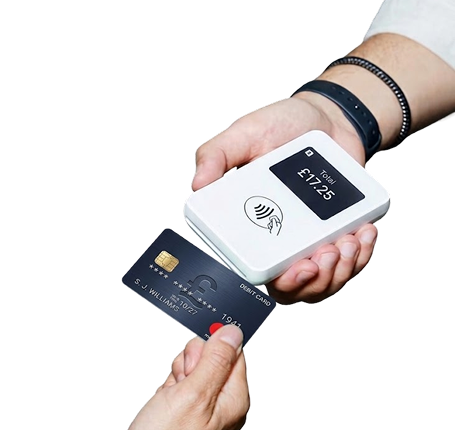
The Faces card reader machines page describes itself as a place to explore card reader providers connected with Faces and compare payment solutions for different business needs. It is written for small businesses, clinics and salons that want to accept card and contactless payments, and it suggests comparing each provider’s features, pricing, payment options and suitability for your business.
The page points out that the right card payment solution depends on how your business accepts payments. Some businesses need a portable device, others a countertop terminal, and some need a specialist solution for unattended payments. It then lists the points to compare:
- Card and contactless support
- Transaction and monthly fees
- Connectivity
- Portability
- EPOS integration
- Contract terms and support
Under “Card reader providers we work withâ€, the page currently lists two providers, each with its own Faces page: Square Card and Acecard. The Square entry describes Square as a payments and business management platform. The Acecard entry focuses on choosing a payment solution that suits both the cost and the day-to-day running of a business. Each provider page sets out that provider’s own pricing, terms and FAQs, which change from time to time, so read them on the day rather than relying on a figure you saw elsewhere.
There is also a section for aesthetics clinics and beauty salons. It says card readers suit clinics that want to accept card and contactless payments for treatments, consultations, appointments and other in-person services, giving clients a simple and convenient way to pay.
Questions to ask before you choose a card reader
The FAQs on the Faces page are deliberately general, and that is sensible advice. On cost, the page says prices vary between providers and devices, and that you should check the hardware price alongside transaction fees, monthly charges and any other applicable costs. On fees, it notes that some providers may offer plans without transaction fees but other charges can apply, so always compare the complete pricing structure. It also confirms that card payment solutions are available for small businesses, including portable options if you take payments away from a fixed location.
Turning that into a checklist for a clinic:
- Total cost, not headline rate. Add up hardware, per-transaction fees, any monthly or minimum charges, payout fees and cancellation terms for a typical month in your clinic.
- Where you take payments. One treatment room, several rooms, home visits or events will point you towards a portable reader or a countertop terminal.
- Connectivity. Check whether the device relies on your clinic Wi-Fi, a phone connection or its own mobile data.
- Deposits and remote payments. Ask whether payment links or phone payments are available if you take deposits before a consultation.
- Records and reporting. Ask how sales are reported, how refunds show up, and whether exports suit your accountant.
- Contract and support. Read the minimum term and how to get help on a busy Saturday.
Payment services are regulated, and every provider runs its own application and checks. Nothing on the Faces page promises that a business will be accepted, and you should not assume it. Read the provider’s terms in full before you sign up.
Keeping payments close to your booking workflow
The Faces card reader page is a comparison and signposting page. It does not describe a direct connection between these card machines and the Faces diary, so ask the provider how its sales records work, and plan your routine around that. In practice, many clinics keep the Faces booking diary as the record of who was booked and seen, and the card provider as the record of what was taken, checked against each other at the end of the day.
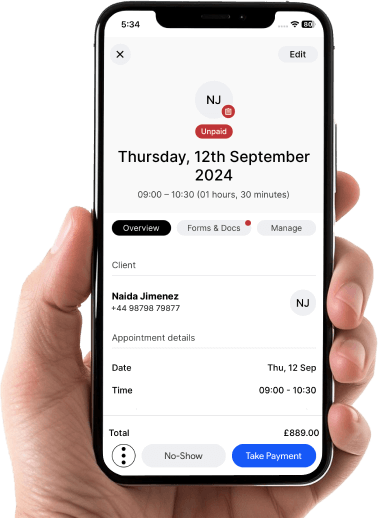
The Faces appointment graphic on the homepage shows the idea: each booking carries its own status, so an unpaid appointment stands out on the day rather than at month end. Whatever card reader you choose, make that daily check part of closing the clinic.
We wrote about joining up the rest of the clinic day in booking software for a connected workflow and in our guide to practice management software and clinic services.
When a client asks to spread the cost
Some clients ask whether they can pay over time. Faces has a separate finance page for clinics that want to offer finance options to their clients. It describes five steps: provide your business details, choose how finance is integrated (with your current system or directly with the Faces app), let clients request finance online or in clinic, receive a decision, and receive payout. It also sets out two registration routes for clinics, with the fees and commission for each shown on the page.
Treat finance as a signpost, not a sales tool. The lender makes its own decision, not every client will be accepted, and a client should never feel pushed into borrowing for an aesthetic treatment. A card reader takes payment for a treatment the client has already chosen; finance is a separate, regulated product with its own rules.
Why Faces
Faces is clinic software built for aesthetics: online booking, digital consent forms, client records and aftercare support, and team tools, with services such as card reader providers and finance options signposted from the same site. It is a booking system with a built-in pharmacy and marketplace.
Faces includes Faces Pharmacy and a multi-seller marketplace, the Faces shop, so clinics can buy products without leaving the system. That means you can book appointments, take consent and order clinic stock from the same Faces platform. Our guide to ordering clinic stock from your booking system explains the weekly routine, and why clinics use a booking system with a built-in pharmacy covers the bigger picture.
The everyday items that sit beside the card reader on your checkout desk and in your treatment room are all in the shop:
- Couch rolls, including the Bed / Couch roll (Blue/White)
- Gloves, such as Pink Nitrile Gloves Powder Free (Medium)
- Sanitisers and wipes, including Clinell Universal Sanitising Wipes x 225 (bucket) for wiping down a shared card reader between clients
- Aprons, such as 200 Disposable Polythene White Aprons
For a fuller stock list, see a smarter stock plan for clinic consumables.
Ash talks about running and growing a clinic on the Ash from Faces YouTube channel, including Stop paying for growing your aesthetic business and The best aesthetics booking system. For day-to-day updates, follow Faces on Instagram and Faces Pharmacy on TikTok.
Compare card readers and set up Faces
Start with the providers on the Faces card reader page, compare the full costs and terms for a typical month in your clinic, then set up your Faces account so booking, consent and stock sit in one place.
FAQs
What is a clinic card reader?
A card reader machine is a device that lets a business accept electronic card payments, including supported contactless and chip and PIN transactions. In a clinic it is usually used at checkout for treatments, consultations and products.
Which card reader providers does Faces work with?
On 20 November 2026 the Faces card reader machines page listed Square Card and Acecard, each with its own provider page. Check the page for the current list.
How much does a card reader cost for a clinic in the UK?
Prices vary between providers and devices. Compare the hardware price with transaction fees, monthly or minimum charges, payout fees and contract terms. Each provider’s Faces page shows its own current pricing.
Does the card reader connect to the Faces booking diary?
The Faces card reader page compares providers and does not describe a direct connection to the diary. Ask the provider how its sales records and exports work, and match payments to appointments as part of your end-of-day routine.
Can I offer clients finance through Faces?
Faces has a separate finance page for clinics that want to offer finance options. The lender makes the decision, acceptance is never guaranteed, and finance should only ever be the client’s choice.
This article is general information for clinic owners, not financial or legal advice. Provider details, pricing and terms change, so always read the provider’s current terms before signing up. Square and Acecard have not endorsed this article.
Ashley James Simpson-Davies INP MSc RN